6. Work on an issue
In this chapter: take an issue from the board to a merged pull request: a branch, commits that name it, a coding agent if you like, a draft pull request, and the merge requests waiting on you. Most of this needs a real repository; the demo has a merge request to review.
Tell laneway where the code is
Map each project to its checkout:
jira:
  repos: {ABC: ~/src/abc}
That one line feeds most of this chapter, and your commits into the
standup and the worklog proposals. In the browser, everything here runs on
the machine laneway web runs on.
A branch for the issue
ctrl+y on a card or in the panel copies a branch name for it
(ABC-12-login-fails; ui.branch_template shapes it). Start laneway
inside a branch named after an issue and it offers that issue: the
terminal opens it, the browser's palette lists it first.
Commits that name the issue
In the repository, once:
laneway hook install
From then on a commit on issue/ABC-12-fix that names no issue gets the
key in front: fix it becomes ABC-12 fix it. A branch without a key
refuses the commit; merges, reverts and fixups pass. -strict also
refuses keys Jira doesn't know. Checking out an issue's branch while it's
still to do asks move ABC-12 (To Do) to In Progress? [y/N].
Start work with an agent: S
With herdr running, S on an issue starts work: the
issue's worktree opens as a herdr workspace with a coding agent in it. One
form shows the agent (those on your PATH, ui.work_agent first), the
branch and the prompt (jira.start_prompt), all filled in and editable;
enter starts it. An empty prompt starts the agent without one. Without
herdr, the terminal says it needs herdr and the browser hides it.
Starting can do more, each off until you turn it on:
ui:
  start_assigns: on           # assign the issue to you
  start_status: In Progress   # and move it there
  timer_on_start: on          # and start the timer
jira:
  start_statuses: {ABC: Doing, OPS: ""}   # per project, over ui.start_status
With any of them on, the form has an Also row listing them, ticked; untick them for this start.
While it runs, its card shows how it's doing, with a notification when it waits on you:
| Mark | Means |
|---|---|
⚙ |
working |
✋ |
waiting on you |
✓ |
done, not looked at yet |
○ |
idle |
◌ |
a worktree without an agent |
The panel lists the issue's agents: send one a prompt, stop it, or start another in the same worktree.
S again, a click on the card's mark, or the agent's row in the panel
attaches to its terminal; herdr's ctrl+b q detaches. Rather keep the
board in sight? ui.agent_view: panel puts the agent in the panel, and
ctrl+\ goes back to the issue. Inside herdr it focuses the agent's
pane instead.
ctrl+\, or 4 in the panel, opens the agent's terminal in the
panel's Terminal tab, drawn by xterm.js; every key goes to the agent
until ctrl+\ hands them back. alt+s starts another agent in the
worktree. A click on the card's mark opens Agents.
Try it:
Son a small bug, pick your agent,enteron the empty prompt. Go back to the board and watch its card turn✋or✓.
All your agents
Every agent on an issue, grouped by state, the ones waiting on you first,
each with its issue's summary and status, whichever site it's on. Beside
the list, the cursor's agent's own terminal, live. enter types into it,
ctrl+\ goes back to the list. v opens the issue, p sends a prompt,
d twice stops it, tab adds the worktrees without an agent. The header
counts the agents waiting and working; a click opens the list.
ctrl+g.
ctrl+g or g a. z makes the terminal full size, t takes input
over from another window attached to the same agent, f focuses it in
herdr, N starts another in its worktree. ctrl+shift+c copies, and
shift+drag selects while the program has the mouse.
Open a pull request
The issue's actions (A) → Open a pull request pushes the issue's
branch and opens a draft, titled with the key and summary and linking the
issue: gh for a GitHub origin, glab otherwise. D in the panel lists
it, with its builds, deployments, branches and commits. Without Jira's
GitLab integration, laneway finds the merge requests whose title names the
issue's key. Cards show the state (pr in ui.card_fields), and the
search pr:open finds the ones with an open one.
Once it's merged, Remove its worktree in the same actions removes the checkout. Uncommitted changes keep it; the branch stays.
Review a merge request
The merge requests waiting on you on every GitLab you're signed in to
(gitlab: in the config, or a glab auth login): review asked, assigned,
or yours with comments you haven't read, Jira key or not. Each shows its
state, pipeline by stage with its jobs' logs, approvals and who they wait
on, your pending notes and the description; its diff has the threads under
their lines.
- Notes go into your pending review, which only you see until you submit it: comment, approve or request changes, with a summary. Or just approve.
- Mark a range of lines for a note, or suggest a change.
Chands the review to yourui.work_agent, in a worktree of the source branch. Its findings land in your pending review, for you to edit, drop or submit.nNstep through threads,eshows the whole file,van earlier push.Mmerges it: squashed or not, the branch deleted or kept, GitLab's defaults first.- Edit it: title, draft or ready, reviewers and assignees from the project's members (one of each on GitLab's free tier), labels, target branch, description.
- A merge request on a GitLab without a token says how to sign in:
glab
  auth login --hostname <host>
, or a personal access token with scopeapiundergitlab:in the config. Reload once signed in; no restart.
alt+m lists them; enter reads one in the panel, i the Jira issue
it names, p its pipeline's jobs (enter a job's log, followed while
it runs), e what to edit, the description in $EDITOR. d opens
the diff over the screen, files on the left.
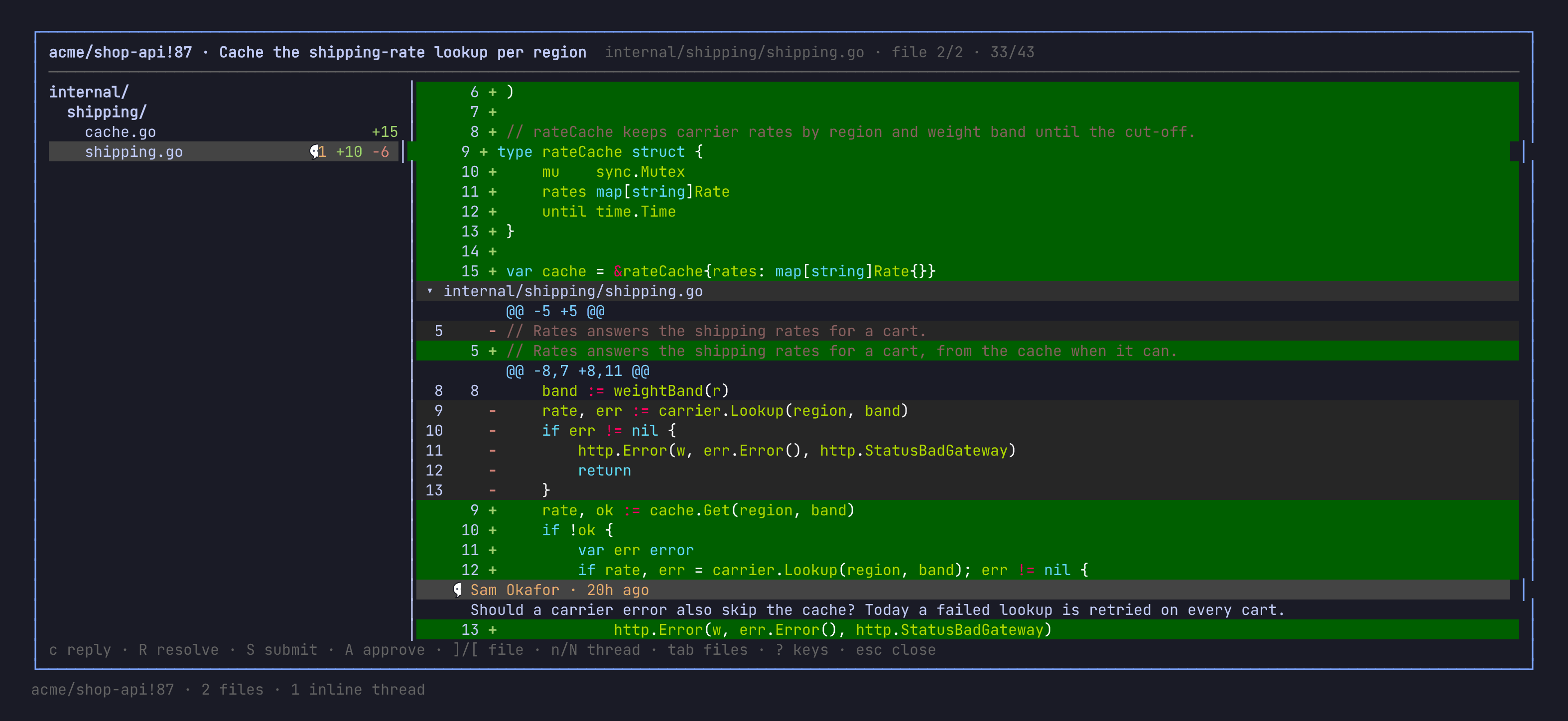
In the diff, c writes a note on the line or a reply on a thread, V
marks a range first, s suggests a change. E rewords a pending note,
x drops it, R resolves a thread. S submits, A approves, M
merges.
] [ change file, ? lists the rest. Leaving with unsubmitted notes
says so.
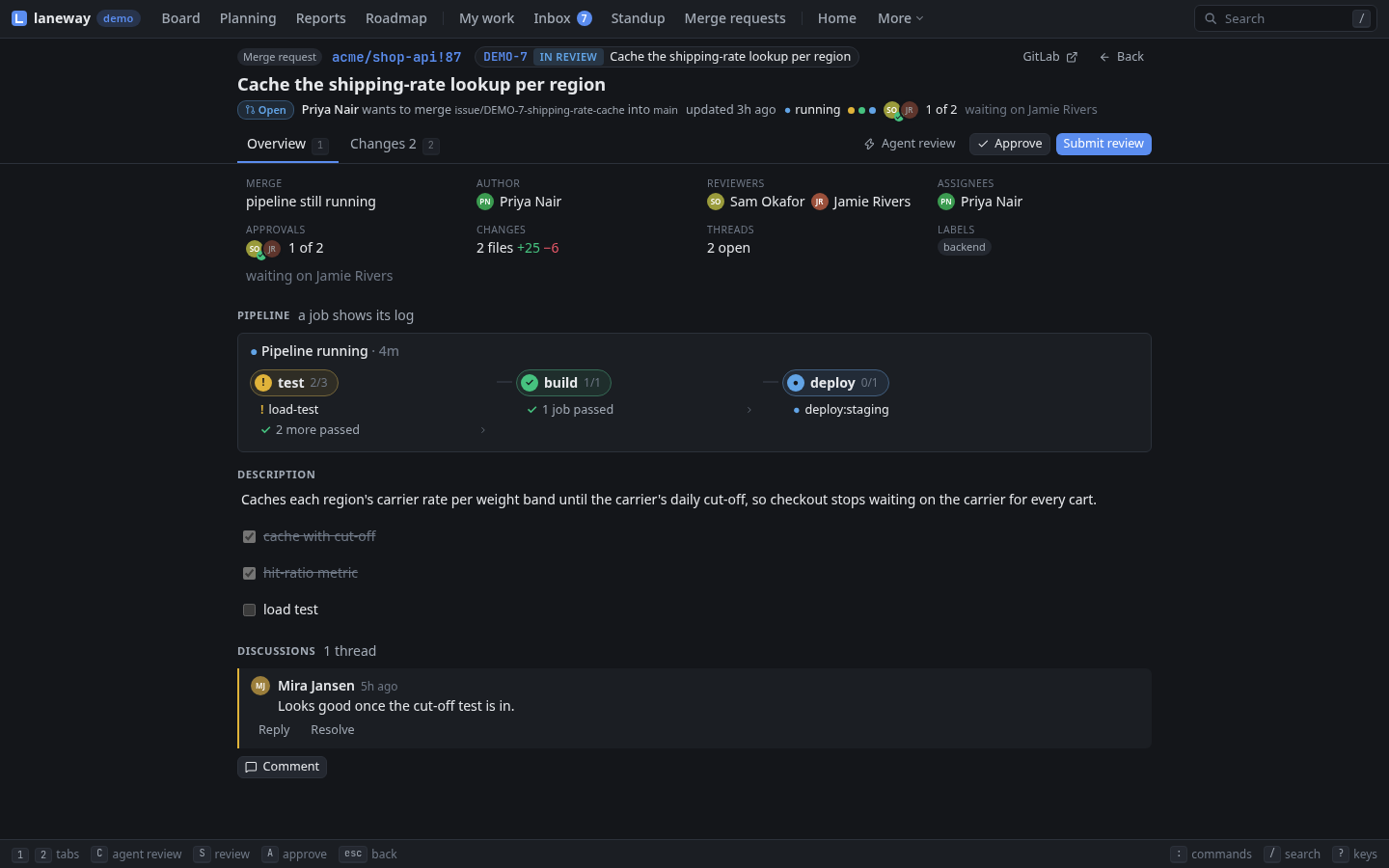
g M lists them; enter opens a merge request's page: Overview
(1) with the pipeline, the job logs and the discussion, Changes
(2) with the diff. i shows the Jira issue beside it. A click on
the title or a field edits it, e lists what can change.
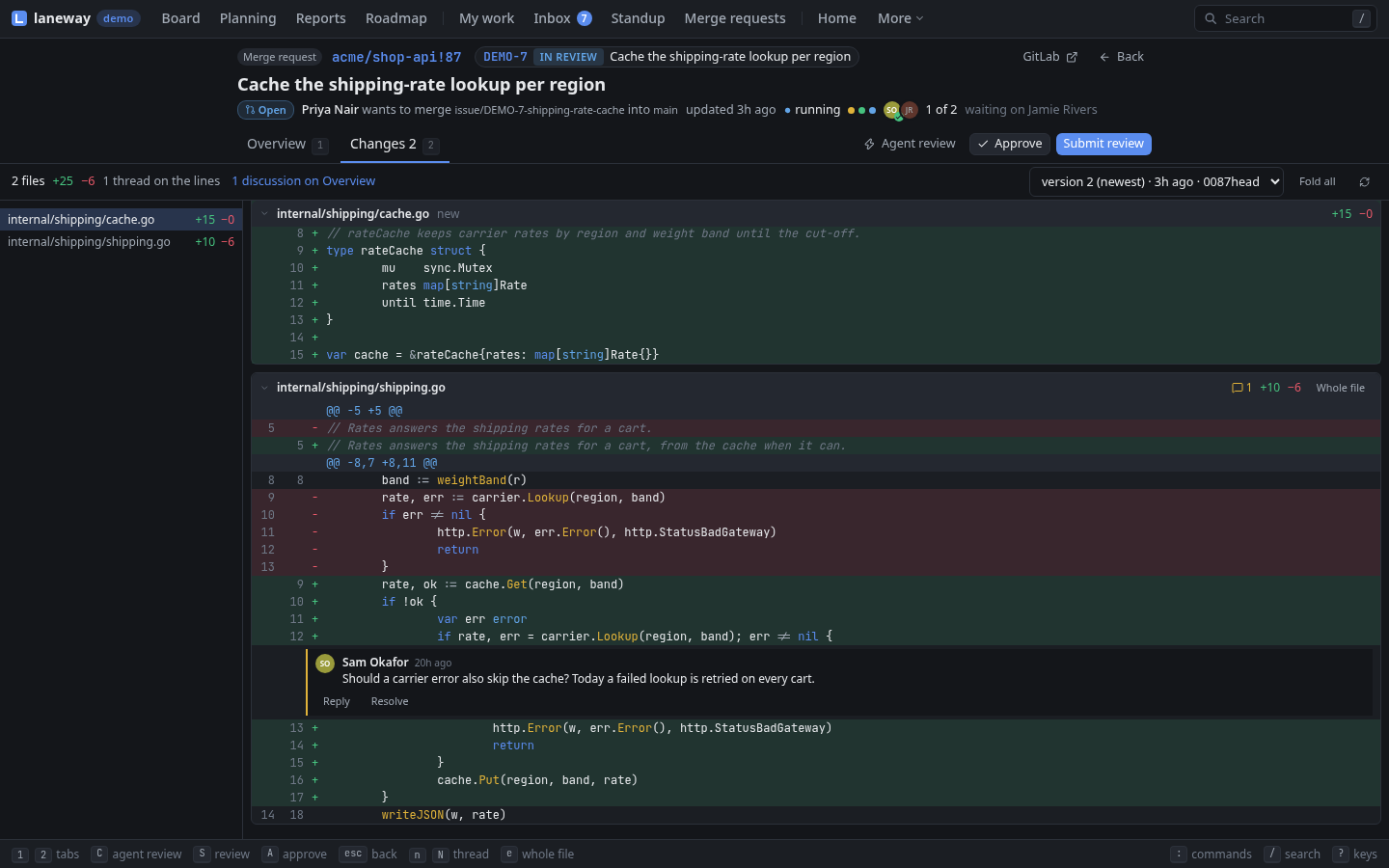
In the diff, a click on a line number writes a note there, shift+click
marks a range. Suggest, edit, drop, reply and resolve are buttons. S
submits, A approves, M merges, j k change file.
Recap
jira.reposmaps a project to its checkout.ctrl+ya branch name,laneway hook installkeys in commits.Sstarts an agent in a worktree, the card shows its state; its terminal is a key away.- All your agents in one list, each one's terminal beside it.
A→ pull request,Dlists it,A→ remove the worktree.- Merge requests waiting on you: the pipeline, the diff, notes and a review to submit.
Previous: Your day · Next: From the shell