9. In the browser
In this chapter: run laneway web for good: start it at login, find
your way around its layout, put it on your phone, and know what it does
differently from the terminal and how it keeps your Jira safe.
Start it
laneway web                  # http://127.0.0.1:8484, opens your browser
laneway web -demo            # a generated project, no Jira needed
laneway -site club web       # another site from sites:
laneway web -addr 127.0.0.1:9000 -no-open
serve is an alias. It is the same binary and the same config as the
terminal version: nothing to install, no second login. ctrl+c in the
terminal stops it. A laneway web started while one already runs on the
address opens that one.
| Flag | |
|---|---|
-addr |
address to listen on, 127.0.0.1:8484 by default |
-remote |
allow an address that is not loopback; needs -cert and -key (see Security) |
-cert, -key |
TLS certificate and key files (PEM): serve https |
-no-open |
don't open the browser |
-demo |
serve a generated project instead of Jira; your config's ui: and rules: still apply |
-site and -config are the global flags and go before web.
Start at login
Tick it on the setup page, or toggle it under Settings › App. It installs a
user service, no root: a systemd user unit
(~/.config/systemd/user/laneway-web.service) on Linux, a LaunchAgent
(~/Library/LaunchAgents/com.github.cornedor.laneway.web.plist) on macOS,
running laneway web -no-open on the same address and config with your
shell's PATH. It takes effect at the next login. Not with -demo or
-remote.
The layout
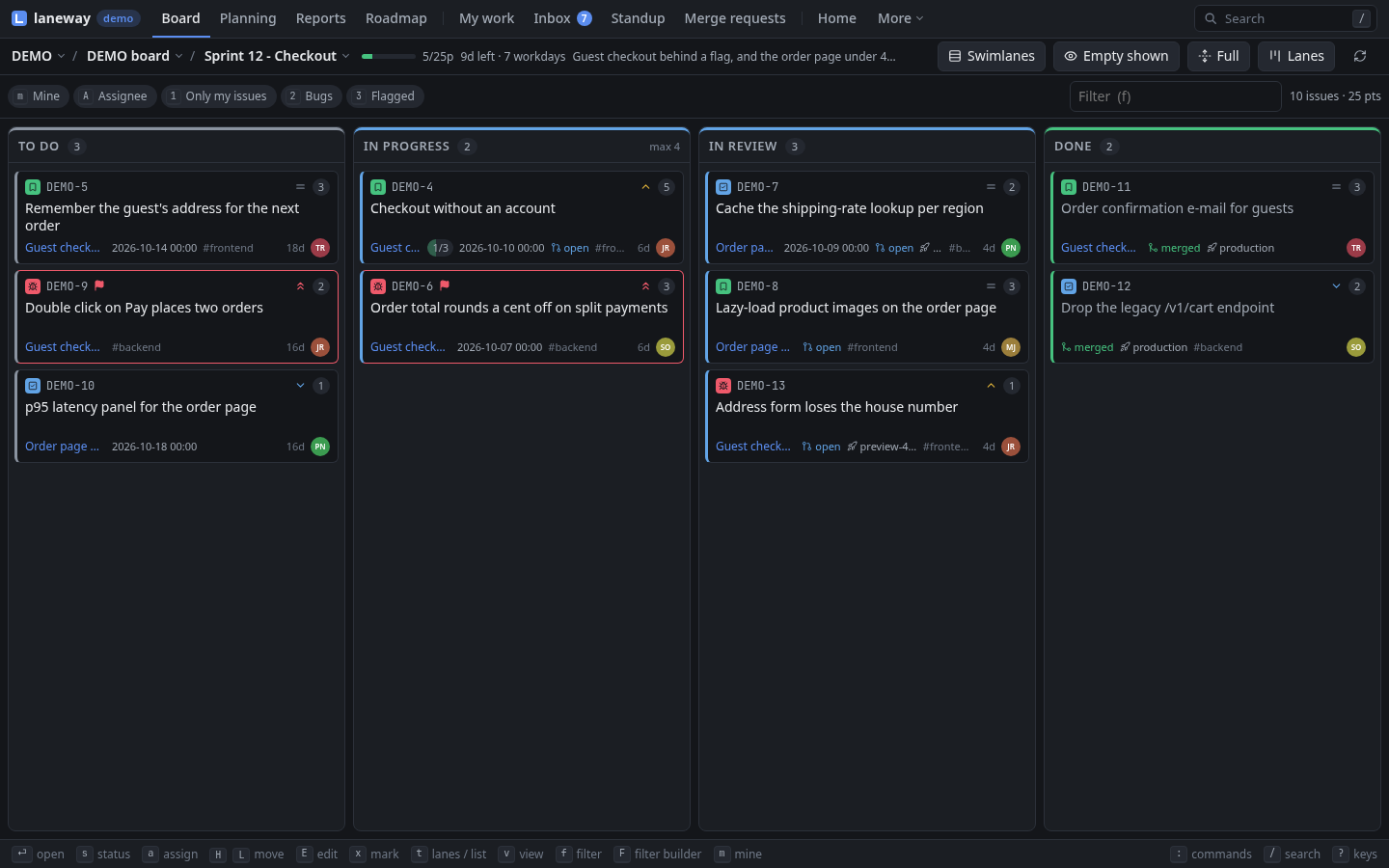
- App bar (on top): the site (
@switches with severalsites:), the views, the tray, search. Views that don't fit fold into More;Mlists every view with its key, Rules and Settings among them. - Tray: only what needs you: offline, queued writes, agents waiting or working, the running timer, a newer release.
- Context bar (under it): where you are (project, board, sprint) and how you look at it (filters, modes). Views without controls have none.
- Key bar (at the bottom): the main keys of what has the focus, the panel's or the view's, as bound; a click presses one. Messages show in it. Hidden on phones; Settings › Appearance turns it off.
- After
ga card lists the keys that can follow.
| View | Key | |
|---|---|---|
| Home | g h |
your day on one screen; the start page with ui.home |
| Board | g b |
lanes or list, filters, drag and drop |
| Planning | g p |
the backlog and sprints, start and complete |
| Reports | g r |
burndown, burnup, cumulative flow, velocity, cycle time, retro, releases |
| Roadmap | g m |
epics on a timeline |
| My work | g w |
your issues, worklogs of a day or week, proposals |
| Inbox | g i |
threads on issues others changed, mentions |
| Standup | g s |
round the team, with the board beside it |
| Agents | g a |
coding agents and worktrees, each one's live terminal (needs herdr) |
| Merge requests | g M |
the merge requests waiting on you on your GitLabs, a page each |
| Rules | g l |
your rules, a live feed, try a change |
| Settings | g , |
every ui: option, appearance, keys |
tab moves focus between the view and the panel; the focused panel owns
the keys, and its digits are its tabs. Every key is in
Browser keys.
Phone and notifications
The page is an installable app (PWA): the shell is cached by a service worker, Jira's answers never are. A new version shows an Update ready message. On a phone, a long press on a card opens its menu as a sheet.
Browser notifications are off until you allow them (Settings ›
Notifications, or N in Rules). Then a mention in your inbox, an agent
waiting on you and a rule's notify raise one; unread inbox threads show
on the app's badge.
What differs from the terminal
Most of laneway works the same in both, on the same config. The guide's tabs show where keys and screens differ; beyond that:
- No local index. The browser reads through the server from Jira; the palette doesn't search issues read before, and nothing answers offline. Writes still wait in the queue while Jira is unreachable, as long as the server runs.
- Images draw in the page, at any size;
iopens a viewer. - Private notes edit in the panel, not in
$EDITOR; the files are the same. - Fields edit with a click; there is no key to walk them.
- Review notes in a merge request's diff take the mouse: a click on a line number.
- A screenshot of a region can't be attached from the browser; paste or drop the image instead.
- Settings add the browser's own look: themes, fonts, density. Key
remaps made there are kept per site, not in
config.yaml. - Agents' terminals are the same
herdr agent attach, drawn by xterm.js. A second window on the same agent takes it over; the first says so. The browser keepsctrl+w,ctrl+tandctrl+nunless laneway runs as an installed app. - Agents, review and actions need herdr,
gh,glaband your commands on the server's machine, as in the terminal.
Both can run at once; a change made in one shows in the other on the next refresh.
Security
- It listens on loopback only.
-addrwith another address is refused unless you pass-remote. - There is no login. Whoever reaches the port acts as you on Jira.
- It is also a shell:
ui.actionsandui.llmrun commands on the machine, and so can whoever drives the page. Never expose it publicly. - The agents' terminal is shell access: typing into a coding agent is running commands as you. It attaches to herdr agent panes only, never an arbitrary shell, and never in the demo. A terminal closes after 30 minutes with nothing either way and reconnects after 8 hours (access checked again); closing it detaches, the agent keeps running.
- The
Hostheader must be a loopback name (or the address it was told to listen on), so a DNS-rebound page can't reach it. A write, and any/api/request with anOrigin, must come from the page's own origin; cross-site requests are refused, WebSockets included. -remotealso needs the launch token: open the URL it prints, with?token=, which sets a cookie; requests without it get 401. Use it on a network you trust.-remoteon an address that is not loopback needs TLS (-cert,-key): the token and cookie never cross the network in plain text. Without a certificate, tunnel instead:ssh -L 8484:127.0.0.1:8484 hostreaches a plainlaneway webon that host, no-remoteneeded.- Over
-remote, settings that run commands (ui.actions,ui.llm,ui.activity,ui.open,ui.clipboard_image,ui.work_agent,ui.work_args,ui.work_create) are read-only: edit them in the config file. Configured actions still run.
Tips
- Views draw from the last answer at once and refresh behind it; the issues around the board's cursor load ahead.
- Long lists are virtual: only what you see is drawn, so a 1000-card limit is fine.
- Moves and edits show at once and roll back with a message if Jira says no.
r(Rin planning, reports, the roadmap and rules) refreshes; Reload data in the palette drops every cached answer.laneway web -demois a safe place to learn the keys.
Previous: Make it yours · Back to the start